Welcome to the creator economy of 2026, where the algorithm is king and your audience's attention span is shorter than a TikTok transition. In this crowded digital landscape, simply posting isn't enough. You need to tell stories that stop the scroll, spark emotion, and build a loyal community. That's where visual storytelling techniques come in; they're the difference between a video that gets lost in the feed and one that lands on the For You Page.
This isn't just another list of vague tips. We're breaking down 10 powerful, actionable techniques that top creators are using right now on TikTok and Instagram to dominate their niches. You'll learn the secrets behind crafting compelling narratives without saying a word, transforming simple clips into must-watch content. Each technique is a powerful tool on its own, but combining them with proven strategies for viral content is how you build an unstoppable brand.
To stay ahead of the curve, savvy creators use tools like the Trendy app to pinpoint which trends are about to take off, ensuring their visual stories always land with maximum impact. Its AI-powered features analyze your niche for emerging sounds and visual formats, so you're always one step ahead. Get ready to transform your content from basic to binge-worthy. You can download Trendy for iOS and Android. Let's dive in.
In the ruthless, lightning-fast world of social scrolling, you don’t have minutes to make an impression, you have milliseconds. The Hook Frame is your digital handshake, your opening line, and your visual bullhorn all rolled into the first 1-3 seconds of your video. This potent visual storytelling technique is designed with one goal: to halt the thumb mid-scroll and demand attention. It’s the visual equivalent of shouting “Wait, you need to see this!”
Think of it as the movie poster for your video. A beauty creator might flash a dramatic "before" and "after" split-screen. A travel influencer could open with a jaw-dropping, vertigo-inducing cliff jump, only to rewind and show the build-up. This isn’t about clickbait; it’s about making a visual promise that the rest of the video will deliver on.
Pro Tip: Your hook is your most valuable real estate. Use Trendy to analyze your content's retention graphs and discover which of your opening frames have the lowest drop-off rates. The app’s AI can even suggest hook templates that are currently going viral in your niche. You can download Trendy for iOS or Android to get started.
Humans are hardwired to love a good glow-up. Visual Progression and Transformation is a powerful storytelling technique that taps directly into this love for progress, showing a clear journey from Point A to Point B. It’s the ultimate visual payoff, creating a narrative arc that feels incredibly satisfying and complete, all within a few seconds. This technique is about showing, not just telling, the change.
Whether it’s a fitness creator revealing a 30-day body transformation or a chef turning raw ingredients into a masterpiece, you're taking the viewer on a mini-adventure. The principles of visual progression are also evident in fields like photography, where telling a story with every photo is crucial for creating cherished wedding albums. For social media, this translates into high-engagement content that people feel compelled to watch until the very end to see the final result.
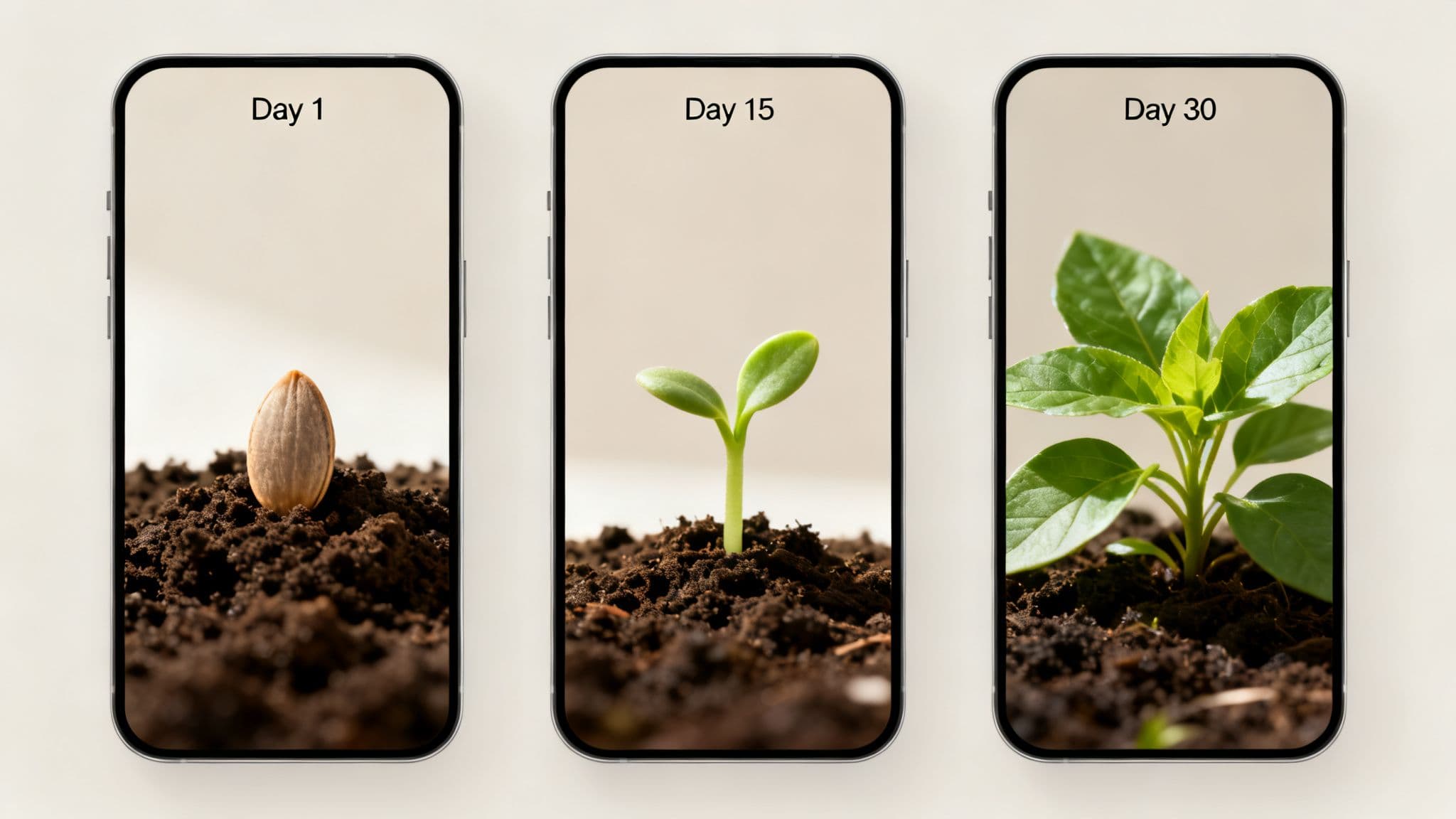
Pro Tip: Transformation content often gets high "Saves" and "Shares." Use Trendy to analyze which of your progression-style videos have the best engagement metrics. Its content analysis feature can reveal the specific types of transformations your audience loves most, so you can create more of what works. You can download Trendy for iOS or Android to get started.
Color isn’t just a background element; it's a silent narrator in your visual story. This powerful visual storytelling technique uses specific palettes, saturation, and brightness to direct the viewer's eye, stir emotions, and create an instant vibe. The right colors can make your audience feel energized, calm, or nostalgic, subconsciously shaping their perception of your narrative before you've even said a word.
It’s the reason wellness content often feels warm and inviting with earthy tones, while a tech gadget reveal might use cool, sleek blues to convey innovation and trust. By mastering color, you gain control over the emotional undercurrent of your content, making your message resonate more deeply and memorably. High-saturation, chaotic palettes appeal to Gen-Z's fast-paced entertainment, while a muted, monochromatic look can scream minimalist luxury.
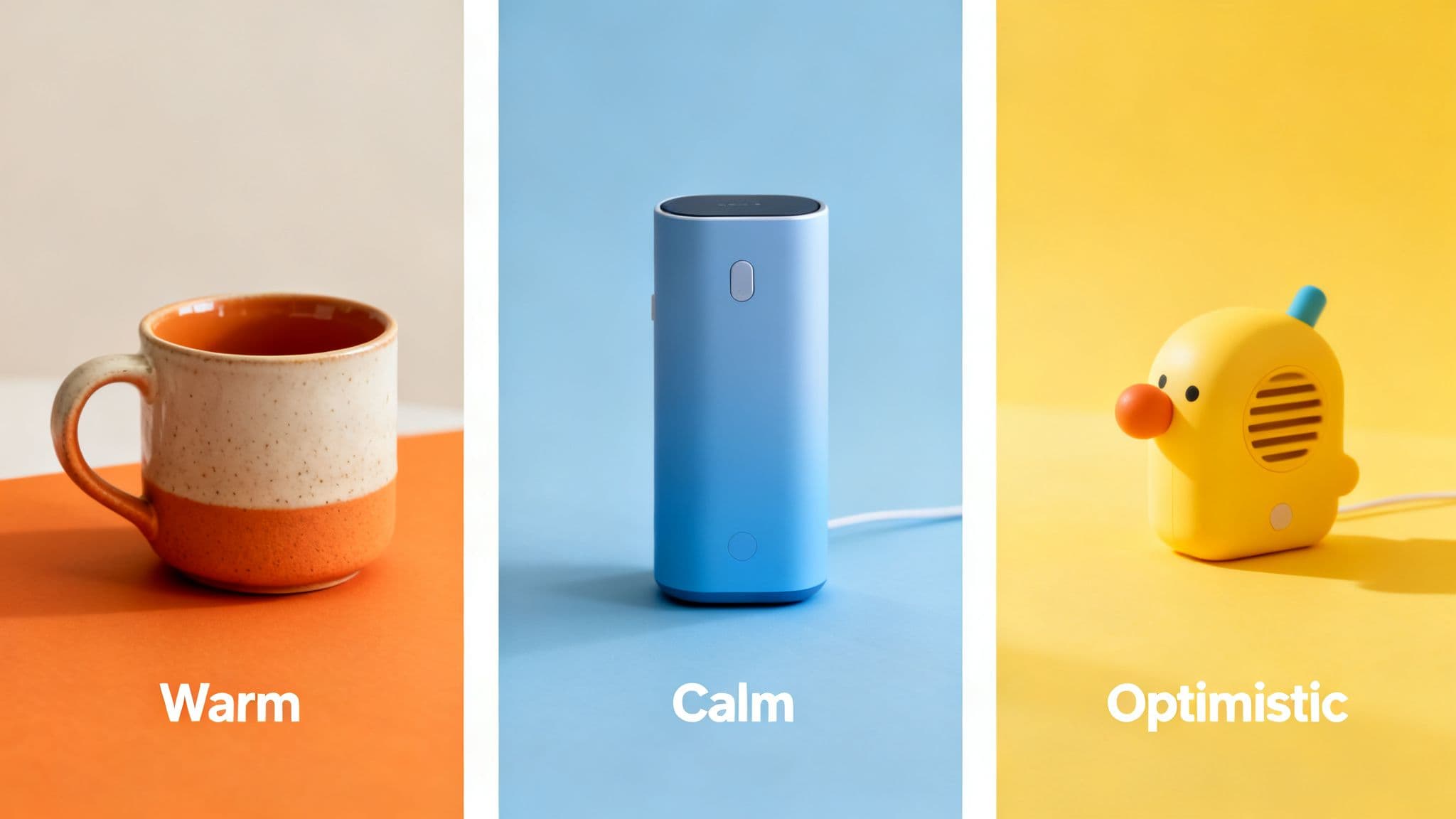
Pro Tip: Don't just guess which colors resonate with your audience. Use Trendy to analyze your top-performing posts and identify color patterns. The app's visual analysis tools can show you if videos with a dominant blue hue consistently get more shares, helping you replicate that winning formula. You can download Trendy for iOS or Android to start analyzing.
In the silent-by-default world of social media, your visuals can be screaming, but if the sound is off, no one will hear. The Text Overlay and Typography Narrative technique turns your text into a primary character in your story. It’s not just about adding subtitles; it’s about using words and fonts as a visual storytelling technique to guide the viewer, inject personality, and land a punchline, even in complete silence.
Think of it as the narrator whispering directly in your viewer's ear. An educational creator uses animated text to break down a complex topic into bite-sized, digestible facts that appear in sync with their actions. A comedian uses quick-fire text pop-ups to deliver a joke's setup and punchline, making the timing even funnier. This is how you direct the audience’s focus, ensuring your core message is unmissable.
Pro Tip: Don't let your text get lost in the background. Use Trendy to analyze engagement on your past videos. The app’s tools can identify if videos with high-contrast text overlays (e.g., white text with a black outline) consistently perform better, giving you a clear, data-backed template for future content. You can download Trendy for iOS or Android to fine-tune your strategy.
In the fast-paced ecosystem of social media, attention is the currency, and nothing buys it faster than pure, unadulterated energy. Montage and quick-cut editing is one of the most powerful visual storytelling techniques for injecting adrenaline directly into your content. It’s the art of stitching together a rapid-fire sequence of short clips to compress time, showcase progress, or evoke a powerful emotion in a matter of seconds.
This technique transforms mundane sequences into captivating narratives. A "day in the life" becomes a dynamic highlight reel, a workout routine becomes an epic training montage, and a product unboxing turns into a rhythmic, visually satisfying experience. By flooding the viewer's senses with quick, purposeful shots, you create momentum that’s nearly impossible to scroll past.
Pro Tip: The success of a montage hinges on its audio pairing. Use Trendy to discover trending sounds and audios that are currently gaining traction. The app’s AI can predict which sounds are about to go viral, giving your quick-cut videos the algorithmic boost they need to reach a wider audience. Download Trendy for iOS or Android to find the perfect soundtrack.
Nothing grabs attention quite like a good old-fashioned face-off. Juxtaposition is one of the most powerful visual storytelling techniques because it taps directly into our brain's love for comparison. By placing two wildly different ideas, images, or scenarios side-by-side, you create instant narrative tension and highlight the very point you’re trying to make, no lengthy explanation needed.
This is the engine behind every satisfying “Expectation vs. Reality” trend, every dramatic before-and-after reveal, and every hilarious “How it started vs. How it’s going” meme. A fitness creator might show a split screen of their first workout attempt next to them easily lifting heavy weights a year later. A small business could contrast a photo of their first sale packed on a kitchen table with a shot of their bustling new warehouse. The story isn't in one image, but in the powerful space between them.
Pro Tip: Contrast-based content often follows specific trend formats. Use Trendy to spot rising "vs." audio or comparison-style video templates. Its trend-spotting AI analyzes top-performing videos in these formats, showing you exactly how others are structuring their visual reveals for maximum engagement. You can download Trendy for iOS or Android to find your next hit idea.
Static images are the past; motion is the language of modern social media. Motion Graphics and Animated Transitions are the secret sauce that elevates your content from a simple slideshow to a polished, professional production. This visual storytelling technique uses animated text, slick transitions, and graphical elements to guide the viewer’s eye, control the pace of your story, and inject a dose of personality that static visuals simply can't match.
Think of it as adding a director's touch to your short-form videos. An educational creator can use kinetic text to make key facts pop off the screen. A business coach might visualize follower growth with an animated chart that climbs dynamically. These elements aren't just for decoration; they are powerful tools for emphasis, clarity, and maintaining viewer engagement through every frame.
Pro Tip: Not sure if your audience prefers high-energy animations or subtle, clean transitions? Use Trendy to A/B test different visual styles. You can compare the performance of your animated videos against your static ones, using the app's detailed analytics to see which style resonates most and drives better engagement. You can download Trendy for iOS or Android to start analyzing.
Instead of just showing your audience a story, this visual storytelling technique invites them to live it. The POV (Point of View) and Perspective Shift puts the camera, and therefore the viewer, directly into the action. It transforms passive watching into an active, first-person experience, creating an instant bond and making your narrative feel personal and deeply relatable.
This is storytelling in its most immersive form. A small business owner might film a "POV: you're unboxing your first order from us" video, making the customer feel the excitement. A fitness coach could use a "POV: you're my client during a training session" to showcase their supportive style. The goal is to collapse the distance between creator and viewer, making them the main character in the story you're telling.
Pro Tip: POV trends can spike in popularity overnight. Use Trendy's trend prediction algorithm to monitor emerging sounds and formats tagged with "POV." The app can help you identify a rising POV narrative before it becomes saturated, giving your content a massive first-mover advantage. You can download Trendy for iOS or Android to get started.
Why tell when you can show on a whole other level? Using visual metaphors is one of the most powerful visual storytelling techniques because it taps into your audience's intellect and emotions simultaneously. Instead of spoon-feeding a message, you use symbolic imagery to represent complex ideas like growth, struggle, or connection, inviting viewers to piece together the meaning themselves. This transforms passive watching into active participation.

This isn’t abstract art theory; it's a practical way to make your content unforgettable. A creator discussing their business journey might use shots of a difficult hike, with each milestone represented by reaching a new scenic viewpoint. Someone sharing mental health insights could use weather imagery, contrasting stormy clouds with a final sunbeam breaking through. This technique builds a deeper bond, making your audience feel smart and understood for "getting it."
Pro Tip: Not sure which metaphors will resonate? Use Trendy to analyze the comments on viral videos within your niche. Its AI-powered sentiment analysis tool looks for recurring words and themes that suggest certain symbolic connections are already being made by your target viewers, giving you a creative shortcut. You can download Trendy for iOS or Android to start your analysis.
In a world saturated with hyper-polished ads, your audience craves one thing above all: reality. This visual storytelling technique taps into the raw power of authenticity, using real footage from your community or unscripted, behind-the-scenes moments to build unshakable trust. It’s about handing the camera over, metaphorically or literally, to prove your brand is more than just a product; it’s a living, breathing part of people’s lives.
This approach transforms your customers into your best storytellers. Think of a skincare brand featuring a customer's genuine, unfiltered video testimonial detailing their journey to clear skin, or a small business owner documenting the messy, chaotic-but-real process of packing orders. This isn’t just marketing; it’s a shared experience that turns passive viewers into a loyal community who see themselves reflected in your content.
Pro Tip: Not all authentic content resonates equally. Use Trendy to analyze the engagement on your UGC and behind-the-scenes posts. Identify which formats, like unboxings or testimonials, generate the most saves and shares. This data helps you build campaigns that encourage the specific content your audience loves. Download Trendy for iOS or Android to discover what your audience truly finds authentic.
| Technique | Implementation 🔄 | Resources ⚡ | Expected Outcomes 📊 | Ideal Use Cases 💡 | Key Advantages ⭐ |
| The Hook Frame | Low–Medium (iterative A/B testing) | Low (single-frame assets, quick edits) | High 📊 — boosts watch-through & reach, ⭐⭐⭐ | Short-form TikTok/Reels, attention-first content | Immediate attention capture, easy to apply |
| Visual Progression & Transformation | Medium–High (plan multiple stages) | Medium–High (staged shoots, consistent editing) | High 📊 — strong saves/shares, clear proof, ⭐⭐⭐ | Fitness, beauty, makeovers, product journeys | Satisfying narrative closure, demonstrates results |
| Color Psychology & Visual Hierarchy | Medium (design + testing) | Low–Medium (palette, color grading tools) | Medium–High 📊 — better brand recall & emotion, ⭐⭐⭐ | Brand storytelling, product-focused content, Gen‑Z targeting | Guides eye, builds emotional resonance |
| Text Overlay & Typography Narrative | Medium (copy + timing + legibility) | Low (templates, caption workflows) | High 📊 — improves comprehension & retention, ⭐⭐⭐ | Silent videos, educational clips, accessibility-first content | Clarifies story, increases accessibility |
| Montage & Quick-Cut Editing | High (complex editing & pacing) | High (lots of footage, music sync) | High 📊 — high energy & engagement, risk of overload, ⭐⭐⭐ | Travel, workouts, day-in-life, music-driven clips | Fast-paced momentum, shows multiple moments |
| Juxtaposition & Visual Contrast | Medium (clear framing & timing) | Low–Medium (paired shots or split-screen) | High 📊 — memorable comparisons & shareability, ⭐⭐⭐ | Expectation vs reality, product before/after, humor | Creates strong contrast-driven moments |
| Motion Graphics & Animated Transitions | High (animation/design skill) | High (software, templates, rendering) | High 📊 — elevated polish & clarity, ⭐⭐⭐⭐ | Explainers, brand videos, feature highlights | Professional look, precise emphasis & pacing |
| POV & Perspective Shift | Low–Medium (camera setup, context) | Low (phone/rig, simple edits) | High 📊 — strong immersion & relatability, ⭐⭐⭐ | Day-in-life, service demos, narrative skits | Immediate identification, easy to produce |
| Visual Metaphor & Symbolic Imagery | Medium–High (conceptual planning) | Medium (props, art direction) | Medium 📊 — deep engagement with interpretive audiences, ⭐⭐️⭐ | Brand storytelling, thought leadership, emotive topics | Sophisticated meaning, brand differentiation |
| UGC & Authentic Documentation | Low–Medium (coordination & curation) | Low–Medium (community management, rights) | High 📊 — trust, social proof, community growth, ⭐⭐⭐ | Testimonials, BTS, customer stories, authenticity campaigns | Builds credibility, reduces production burden |
And there you have it: ten powerhouse visual storytelling techniques ready to be deployed in your next TikTok or Instagram Reel. We've journeyed from the magnetic pull of the Hook Frame to the raw, trust-building power of Authentic Documentation. We've seen how concepts like Color Psychology can manipulate mood, how Quick-Cut Editing can dictate pace, and how a simple Perspective Shift can completely reframe your narrative.
Think of these ten methods not as a checklist to complete, but as a versatile toolkit. The magic isn't in using every technique at once; it's about skillfully selecting the right tool for the right story at the right time. A powerful transformation video thrives on Visual Progression, while a comedic sketch might land its punchline perfectly using Juxtaposition. Your goal is to move beyond simply posting content and start architecting visual experiences that resonate deeply with your audience.
The true art of social media storytelling lies in combining these creative techniques with sharp, data-driven strategy. Knowing how to create a compelling visual is half the battle; knowing when your audience is most receptive and what they're eager to see is the other half. This is where many creators hit a plateau, relying on guesswork and hoping for the best. But hope isn't a growth strategy.
To truly master the craft, you need to sync your creative instincts with real-time insights. Understanding which hooks are trending right now in your niche, identifying the audio that’s about to blow up, and pinpointing the exact time your followers are most engaged are the secrets to consistent growth. This is where applying these visual storytelling techniques becomes less of a shot in the dark and more of a calculated move.
That’s precisely why we built Trendy. It’s designed to be the strategic brain behind your creative brawn. Instead of just giving you generic advice, Trendy analyzes your specific profile and niche to deliver personalized, actionable recommendations. It surfaces emerging trends before they become saturated, suggests hook ideas tailored to the techniques we've discussed, and even provides optimal posting times based on your audience’s activity. It empowers you to apply the perfect visual storytelling technique with precision, ensuring your hard work gets the visibility it deserves. The year is 2026, and the most successful creators are the ones who blend art with analytics.
Ready to stop the scroll and start the conversation? Don't just learn the techniques; master their timing and application with Trendy. Download the app today from the Apple App Store or Google Play Store to get the data-driven insights you need to turn your visual stories into viral successes.